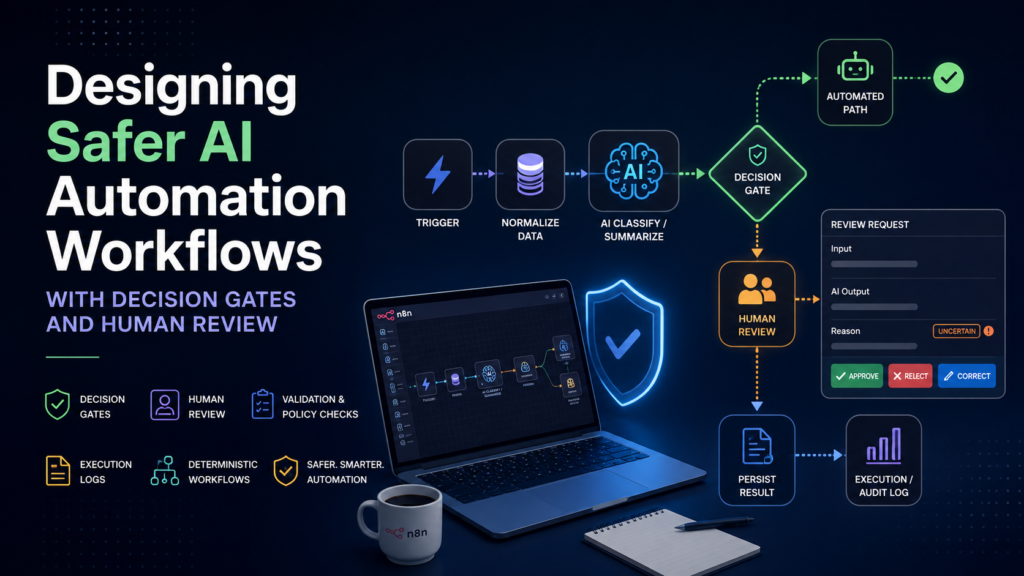
AI makes workflow automation more capable, but it also introduces a new failure mode: a workflow can execute perfectly while making a poor decision. Traditional automation is usually deterministic. A field is present or missing, a threshold is met or not met, and the system follows a defined branch. AI steps are probabilistic, so an output can be plausible, well formatted, and still be wrong. The safest way to use AI in business process automation is therefore not to treat the model as the workflow. The model should be one component inside a controlled system with routing, validation, logging, and human review.
1. Keep the workflow deterministic around the AI step
A reliable pattern starts with a deterministic trigger such as a form submission, webhook, scheduled job, or new record. The workflow then normalizes the incoming data before it reaches an AI node. After the AI returns a classification, summary, or draft, ordinary workflow logic decides what happens next.
For example, a customer-support workflow can ask an AI model to classify a message as routine, sensitive, or uncertain. The classification itself comes from AI, but the routing should be explicit: routine messages may continue to an automated response path, while sensitive or uncertain messages are sent to a human queue. In n8n, this kind of control can be implemented with conditional routing nodes such as IF or Switch.
2. Add confidence and policy gates
A useful AI output is not automatically an authorized action. Before a workflow changes data, sends an external message, approves a transaction, or performs another consequential action, it should pass a policy gate. That gate can combine the model output with ordinary business rules.
Consider an AI step that labels an incoming request. A decision gate can check the requested action, customer tier, keywords, missing fields, and whether the model marked the result as uncertain. This reduces the number of cases in which the model alone determines the final action. It also gives the automation team a clear place to encode business policy that can be reviewed and tested independently of the prompt.
3. Design a human-review path before production
Human review should not be an emergency patch added after failures appear. It should be designed as a normal branch of the workflow. The review step needs enough context for a person to make a decision quickly: the original input, the AI output, the reason the case was escalated, and the action the workflow proposes to take.
A good review branch also defines what happens after the person responds. The workflow should be able to continue from approval, rejection, or correction without forcing an operator to restart the whole process manually. This makes the human step part of the automation architecture rather than an exception outside it.
4. Log the evidence needed to debug decisions
Execution history is essential when AI is involved. Teams need to know not only whether a workflow succeeded, but also what data entered the AI step, what output came back, which branch was selected, and what final action occurred. n8n provides execution views that allow teams to inspect workflow runs and retry failed executions.
For business-critical processes, it is also useful to store a compact audit record in a database, spreadsheet, or logging platform. That record can include an execution identifier, timestamp, input category, model decision, routing result, human-review status, and final outcome. The purpose is not to store every possible piece of data; it is to preserve enough evidence to reproduce and explain the decision.
5. Test branches, not just happy paths
AI workflow testing should include normal requests, incomplete requests, contradictory inputs, sensitive cases, malformed data, and examples that are deliberately ambiguous. The goal is to verify the complete routing behavior, not simply to confirm that the AI can produce a reasonable answer.
A practical test sequence is to validate one node at a time, then test each branch, then test full end-to-end executions. When a failure occurs, the workflow should fail visibly or route to a controlled fallback. Silent success is dangerous when the downstream action is wrong.
A practical reference architecture
A compact architecture for many AI-assisted workflows is: Trigger -> Normalize data -> AI classify or summarize -> Decision gate -> Automated path or human-review path -> Persist result -> Execution/audit log. The pattern works for customer support, document triage, lead qualification, internal requests, content review, and many other processes.
The key principle is separation of concerns. AI handles tasks that benefit from language understanding or probabilistic judgment. Deterministic workflow logic handles permissions, routing, validation, and system actions. Humans handle the cases where policy, ambiguity, or business impact requires judgment.
Conclusion
Reliable AI automation is less about making the model more autonomous and more about building a system that knows when autonomy is appropriate. Decision gates, human review, execution history, and explicit fallback paths make AI workflows easier to test, explain, and operate. Tools such as n8n make these controls visible on the workflow canvas, which helps teams treat AI as one component in a governed process rather than as an unchecked decision maker.
Resources
n8n documentation: docs.n8n.io
Practical beginner course by the author: AI Automation with n8n: Build Real Workflows Step by Step
Author
MD Faisal Khan is a software engineer and Udemy instructor focused on practical AI automation and n8n workflow design. His course teaches build-first workflow automation using AI processing, conditional logic, Google Sheets, APIs, human review, testing, and debugging.
